Learn Something Today and Gain Knowledge

How to write a successful CV in a professional way

By on 17:26


Threatening Man with CV

What is a CV?

Curriculum Vitae: an outline of a person's educational and professional history, usually prepared for job applications (L, lit.: the course of one's life). Another name for a CV is a résumé.
A CV is the most flexible and convenient way to make applications. It conveys your personal details in the way that presents you in the best possible light. A CV is a marketing document in which you are marketing something: yourself! You need to "sell" your skills, abilities, qualifications and experience to employers. It can be used to make multiple applications to employers in a specific career area. For this reason, many large graduate recruiters will not accept CVs and instead use their own application form.
Often selectors read CVs outside working hours. They may have a pile of 50 CVs from which to select five interviewees. It's evening and they would rather be in the pub with friends. If your CV is hard work to read: unclear, badly laid out and containing irrelevant information, they will just just move on to the next CV.
Treat the selector like a child eating a meal. Chop your CV up into easily digestible morsels (bullets, short paragraphs and note form) and give it a clear logical layout, with just the relevant information to make it easy for the selector to read. If you do this, you will have a much greater chance of interview.
An application form is designed to bring out the essential information and personal qualities that the employer requires and does not allow you to gloss over your weaker points as a CV does. In addition, the time needed to fill out these forms is seen as a reflection of your commitment to the career.
There is no "one best way" to construct a CV; it is your document and can be structured as you wish within the basic framework below. It can be on paper or on-line or even on a T-shirt (a gimmicky approach that might work for "creative" jobs but not generally advised!).

When should a CV be used?

  • When an employer asks for applications to be received in this format
  • When an employer simply states "apply to ..." without specifying the format
  • When making speculative applications (when writing to an employer who has not advertised a vacancy but who you hope my have one)

What information should a CV include?

What are the most important aspects of CV that you look for?

One survey of employers found that the following aspects were most looked for (From the brilliant 2010 Orange County Resume Survey by Eric Hilden)
45% Previous related work experience 
35% Qualifications & skills
25% Easy to read
16% Accomplishments
14% Spelling & grammar
9% Education (these were not just graduate recruiters for whom this score would be much higher!)
9% Intangibles: individuality/desire to succeed
3% Clear objective
2% Keywords added
1% Contact information
1% Personal experiences
1% Computer skills

Personal details

Normally these would be your name, address, date of birth (although with age discrimination laws now in force this isn't essential), telephone number and email.
British CVs don't usually include a photograph unless you are an actor. In European countries such as France, Belgium and Germany it’s common for CVs to include a a passport-sized photograph in the top right-hand corner whereas in the UK and the USA photographs are frowned upon as this may contravene equal opportunity legislation - a photograph makes it easier to reject a candidate on grounds of ethnicity, sex or age. If you do include a photograph it should be a head and shoulders shot, you should be dressed suitably and smiling: it's not for a passport!

Education and qualifications

Some employers may spend as little as 45 seconds skimming a résumé before branding it “not of interest”, “maybe” or “of interest.
BI Business School
Succinct, eloquent, well-structured.
Towers Hamlyn
Your degree subject and university, plus A levels and GCSEs or equivalents. Mention grades unless poor!

Work experience

  • Use action words such as developed, planned and organised.
  • Even work in a shop, bar or restaurant will involve working in a team, providing a quality service to customers, and dealing tactfully with complaints. Don't mention the routine, non-people tasks (cleaning the tables) unless you are applying for a casual summer job in a restaurant or similar.
  • Try to relate the skills to the job. A finance job will involve numeracy, analytical and problem solving skills so focus on these whereas for a marketing role you would place a bit more more emphasis on persuading and negotiating skills.
  • All of my work experiences have involved working within a team-based culture. This involved planning, organisation, coordination and commitment e.g., in retail, this ensured daily sales targets were met, a fair distribution of tasks and effective communication amongst all staff members.

Interests and achievements

Writing about your interests

Reading, cinema, stamp-collecting, playing computer games
Suggests a solitary individual who doesn't get on with other people. This may not be true, but selectors will interpret the evidence they see before them.
Cinema: member of the University Film-Making Society
Travel: travelled through Europe by train this summer in a group of four people, visiting historic sites and practising my French and Italian
Reading: helped younger pupils with reading difficulties at school.
This could be the same individual as in the first example, but the impression is completely the opposite: an outgoing proactive individual who helps others.
  • Keep this section short and to the point. As you grow older, your employment record will take precedence and interests will typically diminish greatly in length and importance.
  • Bullets can be used to separate interests into different types: sporting, creative etc.
  • Don't use the old boring cliches here: "socialising with friends".
  • Don't put many passive, solitary hobbies (reading, watching TV, stamp collecting) or you may be perceived as lacking people skills. If you do put these, then say what you read or watch: "I particularly enjoy Dickens, for the vivid insights you get into life in Victorian times".
  • Show a range of interests to avoid coming across as narrow : if everything centres around sport they may wonder if you could hold a conversation with a client who wasn't interested in sport.
  • Hobbies that are a little out of the ordinary can help you to stand out from the crowd: skydiving or mountaineering can show a sense of wanting to stretch yourself and an ability to rely on yourself in demanding situations
  • Any interests relevant to the job are worth mentioning: current affairs if you wish to be a journalist; a fantasy share portfolio such as Bullbearings if you want to work in finance.
  • Any evidence of leadership is important to mention: captain or coach of a sports team, course representative, chair of a student society, scout leader: "As captain of the school cricket team, I had to set a positive example, motivate and coach players and think on my feet when making bowling and field position changes, often in tense situations"
  • Anything showing evidence of employability skills such as team working, organising, planning, persuading, negotiating etc.

Skills

  • The usual ones to mention are languages (good conversational French, basic Spanish), computing (e.g. "good working knowledge of MS Access and Excel, plus basic web page design skills" and driving ("full current clean driving licence").
  • If you are a mature candidate or have lots of relevant skills to offer, a skills-based CV may work for you

References

  • Many employers don’t check references at the application stage so unless the vacancy specifically requests referees it's fine to omit this section completely if you are running short of space or to say "References are available on request."
  • Normally two referees are sufficient: one academic (perhaps your tutor or a project supervisor) and one from an employer (perhaps your last part-time or summer job). See our page on Choosing and Using Referees for more help with this.
The order and the emphasis will depend on what you are applying for and what you have to offer. For example, the example media CV lists the candidate's relevant work experience first.
When asked what would make them automatically reject a candidate, employers said:
  • CVs with spelling mistakes or typos 61%
  • CVs that copied large amounts of wording from the job posting 41%
  • CVs with an inappropriate email address 35%
  • CVs that don’t include a list of skills 30%
  • CVs that are more than two pages long 22%
  • CVs printed on decorative paper 20%
  • CVs that detail more tasks than results for previous positions 16%
  • CVs that include a photo 13%
  • CVs that have large blocks of text with little white space 13%
CareerBuilder
If you are applying for more than one type of work, you should have a different CV tailored to each career area, highlighting different aspects of your skills and experience.
A personal profile at the start of the CV can work for jobs in competitive industries such as the media or advertising, to help you to stand out from the crowd. If used, it needs to be original and well written. Don’t just use the usual hackneyed expressions: “I am an excellent communicator who works well in a team…… “
You will also need a Covering Letter to accompany your CV.

What makes a good CV?

There is no single "correct" way to write and present a CV but the following general rules apply:

  • It is targeted on the specific job or career area for which you are applying and brings out the relevant skills you have to offer
  • It is carefully and clearly laid out: logically ordered, easy to read and not cramped
  • It is informative but concise
  • It is accurate in content, spelling and grammar. If you mention attention to detail as a skill, make sure your spelling and grammar is perfect!

If your CV is written backwards on pink polka dot paper and it gets you regular interviews, it's a good CV! The bottom line is that if it's producing results don't change it too much but if it's not, keep changing it until it does.
If it's not working, ask people to look at it and suggest changes. Having said this, if you use the example CVs in these pages as a starting point, you are unlikely to go far wrong.

What mistakes to candidates make on their CV?

One survey of employers found the following mistakes were most common
  • Spelling and grammar 56% of employers found this
  • Not tailored to the job 21%
  • Length not right & poor work history 16%
  • Poor format and no use of bullets 11%
  • No accomplishments 9%
  • Contact & email problems 8%
  • Objective/profile was too vague 5%
  • Lying 2%
  • Having a photo 1%

    Choose a sensible email address!

    One survey found that 76% of CVs with unprofessional email addresses are ignored. Here are some (slightly changed) graduate email addresses that you should NOT emulate!
    • death_metal_kitty@hotmilk.com
    • demented_bovine@gnumail.com
    • so_kiss_me@hotmilk.com
    • platypus_mcdandruff@gnumail.com
    • busty-beth@gnumail.com
    • flockynockyhillipilification@gnumail.com
    • virgin_on_the_ridiculous@hotmilk.com
    • yourmywifenowgraham@gnumail.com
    • original_madcow_jane@gnumail.com
    • circle-of-despair@gnumail.com
    • rage_against_the_trolley_fish@mail.com
    • sexylikewoaaaah@hotmilk.com
  • Others 3% (listing all memberships, listing personal hobbies, using abbreviations)

How long should a CV be?

There are no absolute rules but, in general, a new graduate's CV should cover no more than two sides of A4 paper. In a survey of American employers 35% preferred a one page CV and 19% a two page CV with the others saying it depends upon the position. CVs in the US tend to be shorter than in the UK wher the 2 page CV still dominates for graduates but I do see a trend now towards one page CVs: as employers are getting more and more CVs they tend not to have the time to read long documents!
If you can summarise your career history comfortably on a single side, this is fine and has advantages when you are making speculative applications and need to put yourself across concisely. However, you should not leave out important items, or crowd your text too closely together in order to fit it onto that single side.Academic and technical CVs may be much longer: up to 4 or 5 sides.

How do I get my CV down to two pages from three?

  • First change your margins in MS Word to Page Layout / Margins/ Narrow - this will set your margins to 1.27 cm which are big enough not to look cramped, but give you extra space. See www.kent.ac.uk/careers/cv/word-cv.htm#margins for how to do this.
  • Secondly change your body font to Lucida Sans in 10 pts size. Lucida Sans is a modern font which has been designed for clarity on a computer screen. A good rule of thumb is to have your name in about 18 points, your subheadings such as education and work experience in 14 points and your body font as 10 points.
  • Use tables with two or three columns for your academic results and references.
  • Use bullets for content, rather than long paragraphs of text
  • Finally set line spacings to single space
If after all these tricks you are still on three pages you have to be ruthless with your content: read every single word and remove it if it doesn't add value to your CV!

The one page lean and mean CV!

In certain sectors such as investment banking, management consultancy and top law firms, a one page CV, highly focused, highly objective CV, now seems to be preferred. All of these areas have in common that they are highly competitive to enter and it may be that selectors, faced with so many CVs to work through prefer a shorter CV.
There is no point putting lots of detailed information into a CV which doesn't add any value, and in fact, just dilutes the impact. This is called the presenter's paradox. These CVs normally have lots of single line bullets and no personal statement at the beginning. They are fully of factual, as opposed to subjective, content. You must make every word count. They focus on achievements, initiative and responsibilities more than on tasks and duties. When carefully designed, these can be the very best CVs, but also the hardest to write! 

Tips on presentation

  • Your CV should be carefully and clearly laid out - not too cramped but not with large empty spaces either. Use bold and italic typefaces for headings and important information
  • Never back a CV - each page should be on a separate sheet of paper. It's a good idea to put your name in the footer area so that it appears on each sheet.
  • Be concise: a CV is an appetiser and should not give the reader indigestion. Don't feel that you have to list every exam you have ever taken, or every activity you have ever been involved in - consider which are the most relevant and/or impressive. The best CVs tend to be fairly economical with words, selecting the most important information and leaving a little something for the interview: they are an appetiser rather than the main course. Good business communications tend to be short and to the point, focusing on key facts and your CV should to some extent emulate this. The longer and more dense your CV is, the harder it is for an employer to comprehend your achievements. As Mark Twain said: “If only I had more time, I would write thee a shorter letter”.
    HireRight, a candidate due diligence company, found that 63% of applicants provide incorrect information to potential employers. Steve Girdler of t HireRight, commented: “The challenging employment market created by the economic downturn has increased the number of inaccuracies in CVs and job applications, yet most businesses don’t check the claims of those they are about to employ."
    • 38% exaggerated or lied about their education
    • 35% included incorrect details in their employment history
    • 31% made false statements about professional qualifications and memberships.
  • Be positive - put yourself over confidently and highlight your strong points. For example, when listing your A-levels, put your highest grade first.
  • Be honest: although a CV does allow you to omit details (such as exam resits) which you would prefer the employer not to know about, you should never give inaccurate or misleading information. CVs are not legal documents and you can't be held liable for anything within, but if a recruiter picks up a suggestion of falsehoods you will be rapidly rejected. An application form which you have signed to confirm that the contents are true is however a legal document and forms part of your contract of employment if you are recruited.
  • The sweet spot of a CV is the area selectors tend to pay most attention to: this is typically around the upper middle of the first page, so make sure that this area contains essential information.
  • If you are posting your CV, don't fold it - put it in a full-size A4 envelope so that it doesn't arrive creased.

FontsFonts for CVs

  • TIMES NEW ROMAN is the standard windows "serif" font. A safe bet - law firms seem to like it but it isn't easy to read on the screen, especially in the small font size you may need to use to get your CV on one or two pages. If you do prefer to use a serif font, try CAMBRIA which has been designed for screen readability. See the example fonts to the right to see how much clearer Cambria looks than Times New Roman.
  • I personally prefer sans fonts - sans fonts don't have the curly bits (called serifs) on letters. ARIAL is a standard Windows "sans" font and is now used by the BBC web site which used to use Verdana. As you can see sans fonts are cleaner and more modern than Times or Cambria and also look larger in the same "point" size (the point size is simply how big the letters are on the page). However Arial and Times New Roman are so common that they're a little boring to the eye.
    Unnecessary use of complex words or hard to read fonts gives a bad impression: people who use simple, clear language are rated as more intelligent.
  • Classier choices might be VERDANA or LUCIDA SANS which have wider letters than most fonts but if you are running out of space then Arial is more space saving, as is TAHOMA which is a narrower version of Verdana. Notice how, in the example to the right, Verdana looks bigger and easier to read than Times New Roman. CALIBRI is now the standard MS Word font but is smaller and perhaps less clear than Arial, Verdana or Lucida Sans (see the examples to the right again). Never use COMIC SANS of course!
  • FONT SIZE is normally 12 points for the normal font with larger sizes for subheadings and headings.
  • Or 10 points. My favourite CV body text font is 10 point Verdana or Lucida Sans with 12 or 14 points for sub headings.
  • 14 points is too big for the normal body font - wastes space and looks crude.
  • and 8 or 9 points too small to be easily readable by everyone, especially in Times New Roman which should not be used in sizes less than 11 points
  • Although many people use 12 points, some research on this suggested that smaller point size CVs (within reason) were perceived as more intellectual!

  • Most CVs are now read on screen rather than on paper. It's no coincidence that Serif fonts are rarely used on the web - they are much less readable on screen (Times Roman was first used on Trajan's column, 2,000 years ago!), and some fonts, such asVerdana, were designed with screen readability in mind. This web site is set in Verdana which, as you can see, is clear and easy to read.

Different Types of CV

  • Chronological - outlining your career history in date order, normally beginning with the most recent items (reverse chronological) . This is the "conventional" approach and the easiest to prepare. It is detailed, comprehensive and biographical and usually works well for "traditional" students with a good all-round mixture of education and work experience. Mature students, however, may not benefit from this approach, which does emphasise your age, any career breaks and work experience which has little surface relevance to the posts you are applying for now. See an example chronological CV here
  • Skills-based: highly-focused CVs which relate your skills and abilities to a specific job or career area byhighlighting these skills and your major achievements. The factual, chronological details of your education and work history are subordinate. These work well for mature graduates and for anybody whose degree subject and work experience is not directly relevant to their application. Skills-based CVs should be closely targeted to a specific job.  

If you are applying for posts outside the UK, remember that employers in other countries are likely to have different expectations of what a CV should include and how it should be laid out. The "Global Resume and CV Handbook" (available from Reception) and the Prospects website will help you prepare CVs for overseas employment. 

 Emailed CVs and Web CVs

  • Put your covering letter as the body of your email. It's wise to format it as plain text as then it can be read by any email reader.
  • Emails are not as easy to read as letters. Stick to simple text with short paragraphs and plenty of spacing. Break messages into points and make each one a new paragraph with a full line gap between paragraphs. DON'T "SHOUT": WRITE IN UPPER CASE!
  • Your CV is then sent as an attachment. Say you'll send a printed CV if required.

In which format should you send your CV?

A survey of American recruiters found that:
  • 63% preferred MS Office Word format .doc
  • 36% preferred Adobe Acrobat format .pdf
  • 1% preferred rich-text format .rtf
  • 0% preferred text format .txt
  • 0% preferred web page format .html

The most common mistakes made via email include:

  • Accidentally clicking send before the email is ready;
  • Embarrassing spelling and grammar mistakes;
  • Accidentally sending a kiss at the end of a message;
  • Copying a client into an internal email about them;
  • Forwarding an inappropriate email trail;
  • Forgetting an attachment; and
  • Forgetting to blind copy (BCC) on a email (seethe example above!)


PDF (portable document format) is perhaps becoming a widely used format now . There are PDF-readers for all platforms (Windows, MacOS, Linux). This also guarantees that the CV will look the same, no matter what reader is used to view the document. Modern versions of Microsoft Word contain a PDF export function or you can download a free pdf converter such as Cute pdf www.cutepdf.com/Products/CutePDF/writer.asp: you install it and then "print" the document to a folder on your PC. PDFs can however sometimes prevent keyword-scanning software on job boards or applicant-tracking systems from picking up information that allows you to be found.
You can also use MS Word (.doc) format, however .doc format is not guaranteed to be compatible among different versions of Microsoft Word, so a CV might look garbled when opened with an outdated or newer version of Word. Also .doc files may not easily open on computers using Linux and Apple platforms. .doc-files may also contain sensitive information such as previous versions of a document perhaps leading to embarrassment. MS Word documents can contain macro viruses, so some employers may not open these. Send the CV in .doc (Word 2003) format, rather than .docx (Word 2010) format, as not everyone has upgraded to Word 2010, or downloaded the free file converter.
Rich Text Format (.rtf), or html (web page format) are other alternatives but as can be seen from the above survey are not usually preferred.
If in doubt send your CV in several formats. Email it back to yourself first to check it, as line lengths may be changed by your email reader.


If you reply to a job advert, be careful about what information you give.

The following are not needed by employers but can lead to identity theft. Don't include:
  • Date of birth
  • Place of birth
  • Marital status
  • Copies of birth certificate/passport documents or details of your bank
  • You only need to give your first and last names, not your middle name.

8 Signs Of A Bad Relationship

By on 18:01

Communication Problems In Relationships:

If you are not able to communicate with your partner you should look at who is and who is not talking. Communication is the foundation on which any relationship should be built. However, the wrong type of communication can be destructive, which leads to number two.

Constantly Arguing Couples:

If every other conversation ends up in an argument something is wrong. No it’s not because you left the toilet seat up or you cooked chicken instead of steak. Those are just surface issues. You have to sit with you partner and find out the root of the problem.

Distance:

If you are not as close as you once were it’s a definite warning sign. “Absence makes the heart grow fonder”, but to much time apart can cause one to forget. Remember you can be in the same room with someone and still have a world of distance between you. Use all sorts of resources. If you love your partner, try, but pay attention for your well being if it is worth it or not. Only you know if you may be in for a breakup
battle! Trust your heart and your spirit.

Going Places Without You:

Everyone needs a little alone time, but if your partner always wants to go places without you Pay Close Attention to why.

Lying:

This is self-explanatory. In my opinion this is #1 of all the signs of a bad relationship. You know better than anyone when your partner is lying. Honesty in a relationship is the lifeblood in your lifeline!

Cheating in Relationships:

Personally, I believe that true love won’t allow you to cheat, but people make mistakes and God says to forgive…so I shall leave the rest of that thought to you. There are a lot of cheat codes and rules to what different people consider cheating. Discuss this with your partner and live by them.

Abusive Relationships:

Like cheating everyone can make a mistake, but if a person has to hit you to show how much they love you that’s the kind of love you don’t need, and one of the signs of a bad relationship that can not be ignored.

Trust In Relationships:

This is a touchy one. Most often people who can not trust are not trust worthy people. Again no one knows your partner better than you.

How To Borrow Credit From MTN When You Run Out Of Airtime

By on 15:14


Airtel users are currently enjoying this Offer, Now its open to MTN Users, You can now borrow Airtime whenever you need to make Urgent calls and don’t have Airtime on your Phone.

This new product according to them allows you request for airtime from the network on credit, when you have run out of airtime and pay later.

NOTE:- The airtime once received, can be used on any billable activity on the network regardless of whether it is voice, data or a Value Added Service.

The service is available to prepaid customers that have between 0-12 Naira on their account balance, and meet an unspecified including tenure on the network, and recharge frequency.

Follow the Simple Steps below:-
=> Dial *606#
=> Use the display menu to check if you are eligible. Mind you, this services attract 10% charge of what you are requesting for.

Tips and tricks for speeding up your Android devices

By on 15:06


You may have noticed over the past few months that your once-speedy Android device has slowed down considerably. Simple tasks such as switching between apps or returning home are proving more troublesome than before, and you are now experiencing lag in all the wrong places. Things don't have to be this way, however.
These simple tips and tricks can help speed up your device and make it perform like new:

1. Uninstall or disable unused apps


Your device has a limited amount of internal storage and the less free space it has the slower it will perform. If you have filled your device with photos, music, or apps, it is recommended to free up space by either uninstalling unused apps or moving files to cloud storage services like Dropbox or Google Drive.
Uninstalling apps can be done by going to Settings, opening the Apps menu, and selecting the app you wish to uninstall. Preloaded applications from carriers or manufacturers that cannot be uninstalled, known as bloatware, can at least be disabled and hidden from the app drawer using this method.
On smartphones and tablets that include expandable storage you can also move apps to the microSD card. To do this, enter Settings, go to the Apps menu, click the app you wish to move, and select the "Move to SD card" option.


2. Clear app caches
Cached data can build up over time in your applications and affect the performance of your device. Deleting individual caches can be done in the Apps menu, but a number of free programs are available through the Google Play store that can automate the process. Some of the most popular ones include App Cache Cleaner and Clean Master, both of which are available for free.

3. Limit widgets and live wallpapers
Many people would argue that widgets are one of the benefits of using an Android device. They can be helpful for finding information quickly without having to open an app, but at the same time they can eat away at battery life and slow your device.
Reducing the number of widgets, especially data-intensive ones like Facebook, will help your smartphone or tablet run more smoothly and last longer. You can remove widgets from the home screen by long-pressing the one you wish to delete and dragging it to the top of the screen.
Another cool Android feature is the option to use a live wallpaper as your background. Like widgets, however, live wallpapers can slow down your device and drain the battery. You can also change your wallpaper with a long press on the home screen.

4. Disable animations
A hidden settings option in Android will give you access to commands you may have never known existed. Go to Settings, About Phone, scroll down to Build number, and tap it seven times. You will now have access to developer options. These special settings allow you to do a variety of things, but they are meant for advanced users and shouldn't be changed unless you know what you are doing.
One tweak that could speed up your device is disabling animations within the operating system. To do this, open Settings, go to Developer options, and scroll down to the Drawing option. Next, turn off the Window animation scale, Transition animation scale, and Animator duration scale. This will disable animations that occur when you open, close, and switch between apps. Although the interface will look less polished, there should be less lag in performance.


5. Get software updates
Manufacturers and carriers are continually pushing out new software updates to their devices. It is imperative that you be on the latest firmware as these updates usually include security and bug fixes, among other things that will improve the overall stability of your device. To check to see if there is an update available, go to Settings, select About Phone, and choose the "System updates" option.

6. Rooting, ROMing, and more
Risk takers and advanced users can also root their device, which will open the door to new features and even greater performance boosts. Rooting gives you the ability to overclock the device's processor, install a custom ROM, and other things; however it also voids your warranty and could cause irreversible damage to the device.

Facebook To Use Drones And Satellites To Spread Internet Worldwide

By on 16:32

Mark Zuckerberg’s ambitious plan is part of Internet.org – a Facebook-backed initiative involving companies like Qualcomm, Samsung, Nokia, MediaTek as well as Ericsson now owned by Sony.

On Thursday, Zuckerberg for the first time gave an insight about Internet.org’s Connectivity Lab. A Lab comprising of a team of scientists from NASA, Ascenta and top research institutions across the world that has one objective – to “beam Internet to people from the sky”.

“We’re going to continue building these partnerships, but connecting the whole world will require inventing new technology too. That’s what our Connectivity Lab focuses on, and there’s a lot more exciting work to do here” the Facebook co-founder and CEO said

Few weeks ago, some reports claimed an acquisition of drone maker Titan Aerospace by Facebook was imminent. These reports haven’t been confirmed and Zuckerberg made no mention of the company in his post to users of Facebook, making the report still only a rumor.

“Our goal with Internet.org is to make affordable access to basic internet services available to every person in the world” Zuckerberg said.

“Over the past year, our work in the Philippines and Paraguay alone has doubled the number of people using mobile data with the operators we’ve partnered with, helping three million new people access the Internet,” he wrote.

http://www.reuters.com/article/2014/03/27/us-facebook-internet-idUSBREA2Q27420140327
http://www.thatnaijablog.com/2014/03/facebook-drones-for-internet.html

How to Make Nigerian Chin Chin

By on 15:30


Chin Chin is the crunchy deep-fried snack that originated from Nigeria. It is an ideal light refreshment for you and your guests. The Nigerian Chin Chin can last for weeks if stored in an airtight container. With no baking involved in this recipe, Chin Chin is one of the easiest Nigerian snacks to make.

To make some Nigerian Chin Chin, you will need the following ingredients.
Ingredients for Soft Chin Chin

  • 1kg of Plain Flour
  • 150ml of milk / 150g of powdered milk
  • 275g of granulated sugar
  • 250g of margarine
  • 2 medium sized nutmegs | 2 teaspoonfuls of ground nutmeg
  • Vegetable Oil (for frying)
  • If you want the Chin Chin really crunchy, use the following quantities of ingredients
  • 1kg of Plain Flour
  • 75ml of milk / 75g of powdered milk
  • 200g of granulated sugar
  • 125g of margarine
  • 2 medium sized nutmegs | 2 teaspoonfuls of ground nutmeg
  • Vegetable Oil
Directions
  1. Mix the milk and sugar in a bowl and leave to soak.
  2. Note: If you are using powdered milk, mix the milk and sugar. Then add 150ml of water for soft chin chin (75ml of water for crunchy chin chin), mix and leave to soak.
  3. One way to get the sugar to dissolve fast is to grind it in a dry mill before mixing it with other ingredients.
  4. In a separate bowl, mix the ground nutmeg and flour, then rub the margarine into the flour till it has mixed well with the flour, leaving no lumps.Add the sugar/milk mixture to the margarine/flour mixture and mix by hand till a smooth dough is achieved.
  5. Place the dough on a flat surface and start kneading gently with a dough roller.
  6. When the dough is flat, cut into desired sizes.
  7. Deep-fry in hot vegetable oil.
  8. While frying, continuously stir the chin chin till you get a golden brown color.
  9. Scoop the fried pieces onto a flat tray to dry and cool down quickly.
When the chin chin had cooled down completely, store in a dry, airtight container.

Source: http://www.allnigerianrecipes.com/snacks/chinchin.html#sthash.GR5zxh61.dpuf

Making Ice Cream At Home - Nigeria Style

By on 16:38

Don’t go running down to the store or market for an ice cream fix! If you have salt, ice, milk, sugar, and a few Ziploc bags, how about you consider making it yourself? This article will cover several different methods for making ice cream at home. It’s actually really easy, and is a great activity to do with children of any age.

Ingredients
1 cup of milk
1 tablespoon sugar
½ teaspoon vanilla extract
Alternate flavor: if you want chocolate ice cream, add 1 tablespoon of cocoa powder
4-6 tablespoons salt
2 trays of ice cubes
Small amount of butter
5 teaspoons flavored syrup


Freezer Bag Method Of Making Ice Cream

1.  This is good for making individual servings of icecream to be eaten promptly after making. The video at the bottom of this article shows how to make ice cream with a sandwich bag. Pour in the milk, sugar, and flavoring in a quart-size bag.


ice cream

2. Take roughly two quarts of ice, crushed if possible, and place it into the gallon-sized bag with rock salt (also known as coarse salt). Ideally, the gallon bag will be roughly half full with the ice and salt mixture.


3. Place the sealed quart-sized bag with the ingredients into the gallon-sized bag. Make sure the bags stay sealed. Do not allow the contents to mix at any time. If the bags don’t seal sufficiently, seal the top of both bags to ensure they don’t open during shaking.


4. Gently agitate, massage, and shake the bags for about fifteen to twenty minutes. In this amount of time the contents of the quart bag should start to turn into solid icecream. It is important that you are mixing the contents of the inner bag, but you don’t want to be so aggressive that you burst the inner bag or cut it on the ice. Double-bagging should prevent this. If your hands get uncomfortably cold, use a towel or an old T-shirt to hold the bags as you massage them; the bags will be quite cold and might become slippery with accumulated condensation. Consider using gloves or massaging while holding onto the top seal if a towel or similar cloth is not available.


5. Remove the finished ice cream from the sandwich bag and serve.


Your ice cream is ready to be served.

17 Amazing Health Benefits Of Pineapples

By on 10:16


Pineapples are loaded with vitamin A and C, fiber, potassium, phosphorous and calcium. They offer a wide range of health benefits, some of them are explained below:

1. Prevents Free Radical Damage:
Pineapples are a rich source of antioxidants. They fight against free radicals in the body, preventing cell damage. These antioxidants help protect you from diseases like atherosclerosis, heart diseases, arthritis, various cancers etc.

2. Thwarts Off Cold:

Pineapples are abundant in vitamin C and bromelain, which fight against microbial infections. Eating pineapples with the prescribed medicines can help cure cold and cough effectively.

3. Strong Bones:


Rich amount of manganese present in pineapples helps in strengthening bones and connective tissues. A cup of pineapple juice gives you roughly 73% of the required manganese for a day.

4. Healthy Gums:

Eating pineapple strengthens your gums, keeping your teeth healthy and strong.

5. Macular Degeneration:

Macular degeneration is a condition in which adults lose their vision, making difficult for them to read and recognize things properly. Beta-carotene present in pineapples empowers vision and should be consumed regularly for eye health.

6. Anti-inflammatory Action:


Pineapple is very much known for its anti-inflammatory properties which prevent inflammation in arthritis patients and gives strength to the bones.

7. Cures Sinusitis, Sore Throat, Gout, Swellings:
Pineapples are a great source of bromelain which help prevent sinusitis. Pineapples are also effective in curing sore throat, gout and swellings.

8. Anti-cancer Properties:
The abundance of antioxidants in pineapples helps fight against free radicals. This halts the process of cell damage, preventing several types of cancers.

9. Atherosclerosis:


Free radicals cause atherosclerosis which can be easily prevented by antioxidants in pineapples.

10. Heart Health:

Powerful antioxidants keep free radicals away and lower the cholesterol levels, preventing heart diseases.

11. Immunity:

Rich content of vitamin C in pineapples boost your immune system by its strong antioxidant effect.

12. Digestion:

Bromelain, vitamin C and dietary fiber are abundantly present in pineapples which promote digestion.

13. Bronchitis:
Pineapple is known for its anti-inflammatory properties. It helps in reducing inflammation in bronchial tubes which generally arises due to bronchitis.

14. Catarrh:

It is a disorder of inflammation of the mucous membranes in one of the airways or cavities of the body. This disorder can be prevented by eating pineapples regularly.

15. Prevents Hypertension:

If you’re suffering from high blood pressure and trying to prevent it, you might want to consider the pineapple diet for hypertension. Higher amounts of potassium and lower amounts of sodium in pineapples help maintain normal blood pressure levels.

16. Treats Intestinal Worms:

Pineapple contains the digestive enzyme bromelain. A diet rich in pineapple helps clear certain intestinal parasites such as tapeworms.

17. Relieves Nausea:

A key benefit from pineapple juice intake is that it averts nausea or morning sickness. This is quite useful for pregnant women who usually experience nausea. It also helps people who are looking to go on airplane trips that usually cause motion sickness


Source: http://www.stylecraze.com/articles/amazing-health-benefits-of-pineapples/

10 Ways to Keep Your Relationship Strong and Healthy

By on 17:50

Every relationship has its ups and downs, but there are ways to stay on the right track even when the "downs" are hovering around you. Unfortunately so many couples find themselves working against each other when times are tough. Financial situations are the number one cause of marital spats. The anger that arises during these spats commonly lead to other problems such as complete communication break downs, adulterous affairs, and even verbal; emotional; or physical abuse by one or the other, or even both partners. This can be extremely toxic to any relationship, and even worse if there are young witnesses watching their parents go through such trying times. It can also begin or continue a cycle of violence that is very difficult to stop. But there are many ways a couple can avoid turning difficult times into bad times and possible a break-up of what was once a beautiful relationship.
1. Communication - discuss the events that are causing the challenges in your life. Talk about what can be done to improve the situation as well as the pros and cons to the solutions you have each suggested. Keep the lines of communication open at all times for one another.

2. Honesty - Always be honest about your feelings. When you buff a situation with dishonesty just to get through it without too much confrontation or emotional hurt either on your part or your partner's, the problems will continue to linger in the back of your mind and may eventually explode in a sudden burst of anger directed towards your partner which can easily lead to a chain of negative events that can make the original issue seem petty. So keep it real.

3. Trust - trust in your partner and trust in yourself. You must trust in your mate's feelings and suggestions. Do not begin to question your partner's intentions during this time of more genuine issues that need to be dealt with. Trust in yourself to discuss the issues from your heart so your partner knows you are as much determined to find a solution as he or she is.

4. Acceptance - It is very important to accept each other's different opinions. You do not need to agree with one another, but accept each other's ideas and suggestions as a possible solution. Also, bring in your honesty at this point. State that you do not agree, but you are willing to hear them out. No two minds work the same, but together they may find one's strengths may help the other's weaknesses, and vice versa.

5. Compromise - As state above, no two minds work the same; however, compromise it the most powerful tool a couple can use to keep their relationship strong and functional. You each may have your own ideas, but when you combine them, the solution to any current problems will surface quicker than if you do not work together.

6. Step Back - If things get hot and friction begins to effect your communication, step back and give each other a breather. Take a break to rethink what needs to be said. Many times hind-sight is 20/20, therefore, if you take a break, you may be able to re-organize your thoughts and get back to communicating with a clearer mind. Do not get to the point where you both begin to say thing you may regret later.

7. Give In - Sometimes you cannot combine your thoughts to work together. Giving in to one another when you feel you have reached a dead-end with resolutions to what you are discussing, may be the only way out. Giving in is just another form of compromise that we all have to face at times. Don't be stubborn, open up.

8. Creativeness - Stay creative with your suggestions to solutions. When it comes to the common problems of financial woes, find some creative ideas to keep yourselves above water. Whether it is a side job, a yard sale, or even organizing a bake sale, you can always find creative ways to keep the lights on. Just keep them on the right side of the law, and you will find the money one way or another. If it is an issue specifically about your relationship, there are many creative ways to keep the love alive...wink, wink.

9. Humor - Always find the right moment to keep the atmosphere light. My husband is a pro at cutting through the thickness of negativity with a spurt of humor. Make your partner laugh, because if we don't laugh through trying times, then it may seem like an eternity before we reach the other side. A positive attitude is the key to making it through the challenges life puts in your path.

10. Take some "together" time - Find some time to just let it all go and enjoy each other's company. Whether you have found a solution to the problems you are dealing with or not, you need to put it all aside and spend some quality, problem-free, time together. Take a walk, go for a ride, watch a movie, or just cuddle. Remember why you chose to spend your life with the person beside you in the first place and go back to that feeling of contentment without all the reality that goes along with every relationship. Love each other completely.

 -----------------------------------------------------------------------------------------------------------


Etisalat Disses MTN In New Funny Advert

By on 09:50


A very funny video made by Etisalat to diss MTN

World Slimmest Smartphone (Gionee Elife S5.5 is 5.55-mm)

By on 01:05

ELIFE S5.5-2
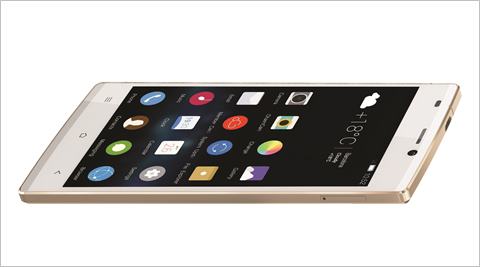
The Gionee Elife S5.5 is 5.55-mm 
 
Gionee’s latest is the “world’s slimmest smartphone”, the ELIFE S5.5. As the name suggests, the phone is 5.55-mm slim.

The ELIFE S series will be a new product category for the company. The S5.5 is equipped with a 5-inch Full HD Super AMOLED plus screen, a true Octa-core 1.7GHz processor, a 13 megapixel rear camera and the world’s first 95 degree ultra-wide angle 5 megapixel front camera. With the 95 degree wide angle front camera, taking self-group shots or full body selfies is made possible and easier than ever before.

The phone will also run AMIGO OS, which has been customized from Android for the ELIFE S5.5. Like the ELIFE E7, the phone consists of two shooting modes, the professional and normal camera settings, as well as the availability of the “Charm Camera” which includes auto make-up mode, footprint mode, and meeting memo mode.

The S5.5 supports HSPA+42 Mbps with up to six different band sets, which allows it to function in most 3G WCDMA coverage areas as well as enabling global 3G roaming.

Full Specifications

5.0” Super AMOLED Plus display
Octa- Core 1.7GHz CPU
Single SIM
13.0MP AF +5.0MP AF Camera 95 Degree Ultra-Wide Angle
AMIGO OS 2.0 (based on Android OS, V4.2)
Memory: 16GB+2GB
Ultra slim 145.1 x 70.2 x 5.55mm
GSM-850/900/1800/1900MHz
WCDMA-850/1900/2100MHz or 900/1900/2100MHz
3.5 mm Earphone Jack
WIFI/GPS/BT4.0/FM/G-sensor
Non-removable 2300mAh Battery
OTG

The GIONEE ELIFE S5.5 is available in Black, White, Blue, Pink, and Purple.

How to Reduce Battery Drain on Your Samsung Galaxy S3 by Fixing Android System Usage

By on 00:29

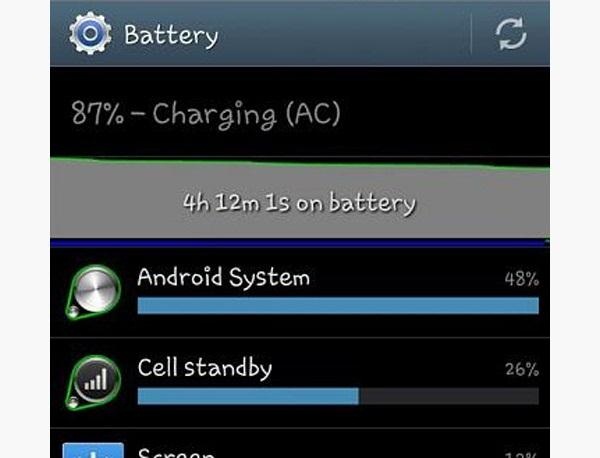
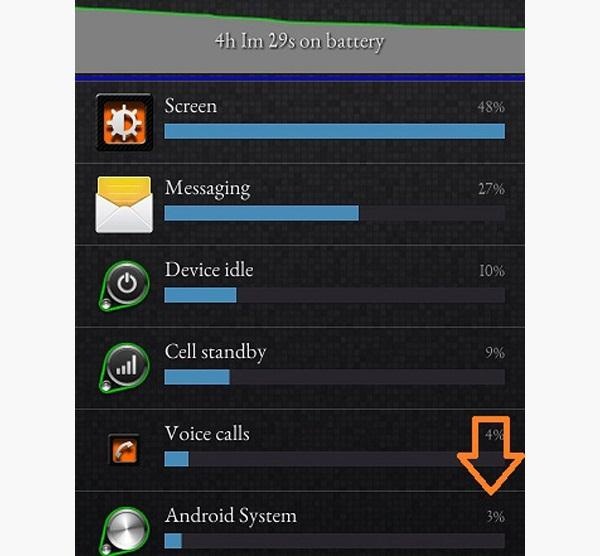
The Jelly Bean update brought a lot of cool features to the Samsung Galaxy S3, but one nasty bug remained. Something was causing "Android System" usage to be consistently high.


Of course, the percentage of this process that is used is dependent on what you're doing at any given time, but it shouldn't be anywhere near this level with "standard" use (calls, texts, emails, light browsing, etc.).

You will need to be rooted to do this.
Pinpointing the Problem

In most cases, our culprit is a file/process called "gsiff_daemon". It's a non-utilized but highly active GPS sensor daemon. Basically, it's an almost always on, but mainly useless process.

To confirm that this is in fact you're culprit, go to Settings, and scroll down toDeveloper Options. Scroll down and check Show CPU Usage. Now you'll see a small overlay on your screen. Look for "gsiff_daemon" to pop up.

Step 1: Fire Up Your Favorite Root File Explorer

You'll need a file explorer that can browse and write to the root of your system. For this how-to, I'll be using a great free one called ES File Explorer (if you use this, make sure to hit Menu, Settings, Root Settings, and check "Root Explorer", "Up to Root", and "Mount File System".

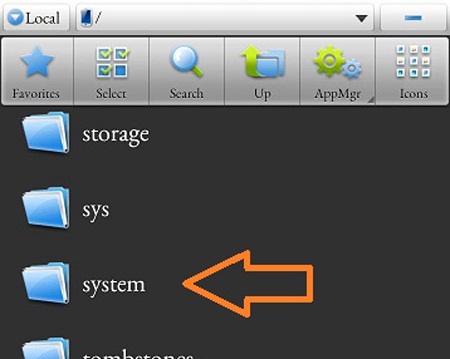
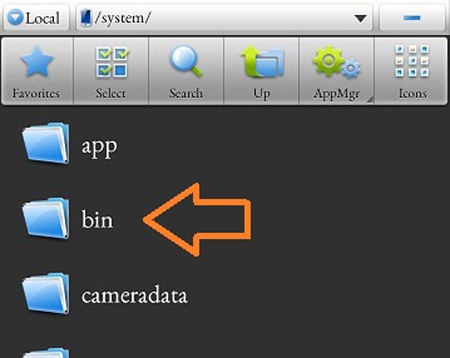
Step 2: Navigate to System/Bin

In ES File Explorer, navigate to the "bin" folder in "system".


Step 3: Rename "gsiff____daemon"

Rename the "gsiff_daemon" file in the bin folder to "gsiff_daemon.bak".

Step 4: Reboot!

Let your phone settle for a bit, and then check out your "Android System" usage.


Turn on CPU Usage in Developer Options and notice that you won't see 'ol gsiff hanging out.

Enjoy your much better battery life.

Cover photo by Gizmorati

SanDisk unveils first 128GB microSD card “designed for Android”

By on 23:59

php5a5coh

At Mobile World Congress in Barcelona, SanDisk has just announced a new accessory that will make many Android users very happy. The company has unveiled the world’s first ever 128GB microSD card. More specifically, the card uses the microSDXC standard, meaning that it works with devices only that are compatible with XC, not just the lower-end HC.

SanDisk does note, however, that the card is “designed for Android” and will be fully compatible with many Android devices. In addition to this new 128GB card, SanDisk will also be updating its “Memory Zone” app for Android, which allows users to easily and access files stored on microSD cards. The app also allows users to back up content to it and free-up internal device memory. A new “OptiMem” will automatically transfer older photos on a device to external memory.

The availability of 128GB microSD cards also signals that we could soon start seeing Android devices with 128GB of internal storage. This would be a big upgrade, especially when the operating system on many devices takes up more than 6GB of space.

The 128GB SanDisk microSD card will run $199.99 when it is released. The card will be available exclusively from Amazon and BestBuy.

New Method How to expand Android Internal Memory

By on 16:24


Your Android smartphone seem very slow? The provision of data and applications is become small? You should intervene and put an end to this glut of data that stationed on RAM and on the internal drive of your phone. How do you? If you want, I can give you a hand.

Follow the tips on How to expand Android memory that you find below and you'll see that immediately sensitive hardly notice improvements in the responsiveness of your smartphone. Do not promise miracles, of course, but if you act with the right decision you should be able to get more than appreciable results. Let's start now!

If you want to expand Android memory or, better said, you want to "liberate" the memory of your mobile phone, you have to reduce the number of running applications and remove all those unnecessary files that accumulate over time on the device.

Now let's see How to expand Android memory by deleting some unnecessary data from the internal drive of your phone. For this task, I suggest you rely on Clean Master.It's an app, which is also free, which automatically analyzes the content of your phone and memory card for all those files that are no longer needed for the proper functioning of Android (e.g. data left behind by deleted app, temporary files, etc.) and delete them with one "tap".

To monitor and release the RAM of your phone I suggest you focus on Easy Task Killer Advanced, very advanced task manager for Android that lets you view all processes running on your smartphone and stop those that slow down performance. Includes a useful function of automatic optimization releasing independently the RAM from all unnecessary processes immediately speeding up the system.

How do I use it? Nothing could be easier. After downloading the app from Google Play Store, avviala and close the initial pressing tutorials for a couple of times the finger on the screen of the phone. Press the green button then OPTIMIZE that sits in the middle of the screen and the application will automatically optimize your smartphone's memory. If you prefer to manually action, seeing what are the processes running on Android, tap on theTaskstab, put a check mark next to the applications that you want to end, and press the button "Kill selected Apps.
To test the ability on your terminal, download it from Google Play Store, avviala and select the type of data you want to delete: History to the history of the app, Residual Files for "orphaned" files left behind from uninstalled applications by telephone, Temp APKs for traces left by the app installation packages and Tasks to free up some RAM (but for this I recommend Easy Advanced Task Killer). Wait so that the software will scan the selected items and tap Clean first, and then click OK to start deleting files.

Clean Master works on all major Android phones giving her best on terminals subject to root (read my guide on How to root on the Android unless you know what I mean), which can operate with more freedom by eliminating more than redundant data.

Of course, don't forget that the best way to free up space on an Android Terminal is delete app that are not used anymore. Carry out this operation is very easy, just go into the menu Settings > Applications > manage applications on your phone, select the name of the application to be deleted and press Uninstall button.

Alternatively, if you have a smartphone with expandable memory via microSD, you can try to move Android apps to sd SD by following the guide that I made some time ago.

Easy Steps to Add Your Blog to Your Facebook Profile

By on 12:59

Difficulty: Easy
Time Required: 5 minutes

Here's How:

  1. Step 1: Visit your Facebook Profile page and select the "Settings" tab under the "What are you doing now?" status update box.
  2. Step 2: Under "Stories Posted by You", you'll see, "You can automatically import activity from YouTube, Flickr and other services to your profile." You need to select the "other services" link.
  3. Step 3: Select "Blog/RSS" on the far right side of the page.
  4. Step 4: Enter the complete URL for your blog.
  5. Step 5: Your blog feed is automatically imported to your Facebook status updates. Next time you publish a post on your blog, check your Facebook profile, and you'll see that post appear as a snippet on your Facebook profile page as a status update. It's that easy to spread the word about your blog using your Facebook profile!

How to make Apple Juice in a Blender

By on 11:14


Things You'll Need: 
Blender 
Fresh fruits and vegetables 
Fine mesh strainer 

Wash your fruits OR vegetables well before juicing. Remove the peels if you are going to make juice from fruits or vegetables with thick, inedible peels, such as cucumber, pineapple or banana. 

2 
Cut the fruits OR vegetables and remove large seeds. You can separate the seeds from fruits such as raspberries or strawberries with a strainer. Larger seeds, such as those found in papaya, oranges or apples, should be removed before blending. 

3 
Add the chopped fruits OR vegetables to the blender, along with a small amount of water. Some fruits, such as pineapple, contain enough juice that your blender can easily blend the fruit without added water. However, this will depend on the ripeness of the fruit, the strength of your blender and your personal taste. 

4 
Strain the juice through a fine strainer to remove seeds and pulp can't be juiced. Use a large spoon to mash the pulp and push the juice through the strainer's meshing. If Using Other fruits and vegetables, such as tomatoes, starfruit and kiwi need not be strained at all. 

5 
Add sugar or honey to sweeten the juice if desired. In most cases, the natural sweet juice is perfect as it is. Apple is one of the sweetest fruits, and is therefore ideal for adding natural sugar to your juice mix.